
This article will walk you through two different options for retrieving SharePoint Item Version History in Power Apps using Power Automate. Both solutions are designed to be ALM-friendly and avoid using Premium Connectors.
If you’re not familiar with SharePoint Item Version History, you can access it by selecting the context menu for a list item and choosing Version History.
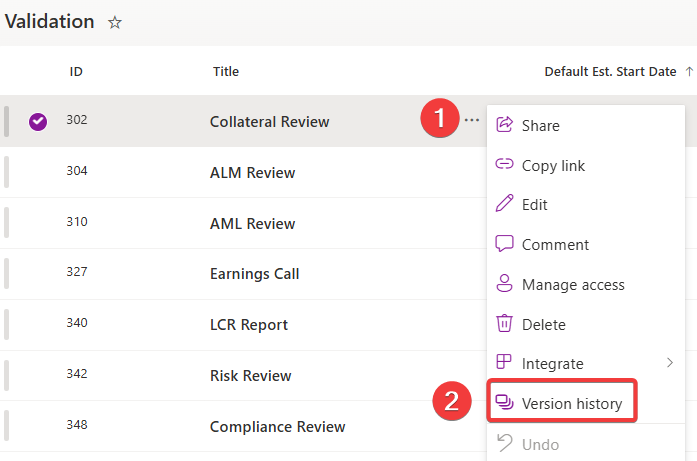
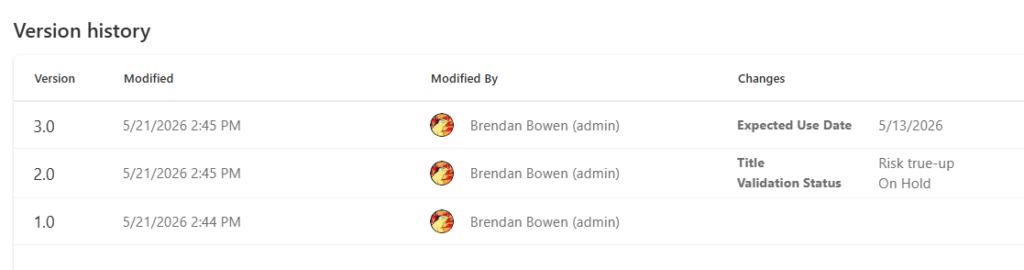
For this example, I have a simple SharePoint list consisting of Financial Validation events. These events are managed out of a Canvas App by many people. As a user, I want to be able to fetch the version history for the event from the PowerApp so I can understand what changes to fields were made by who and when.
I’m making the changes inside of a solution. I have two Environment Variables: One for my SharePoint Site and one for my SharePoint Events List. These will become key later.
My SharePoint List Consists of the following custom columns:
| Column Name | Data Type |
| Expected Use Date | Date Only |
| Validation Status | Choices |
Option 1: Launch the Version history modal dialog in a New Window
Inside the PowerApp, I create a Power Automate where I am passing the item ID into the flow. Then, within the flow, I use a compose action to dynamically construct the URL from my site and list environment variables, and list id.
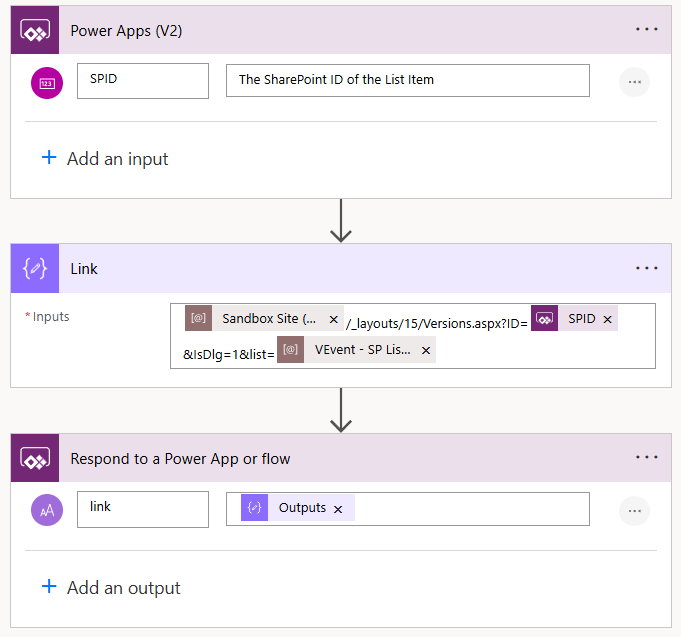
[SHAREPOINT_SITE]/_layouts/15/Versions.aspx?ID=[SPID]&IsDlg=1&list=[SHAREPOINT_LIST]The whole process is wrapped in the launch function to open the version history in a new tab:

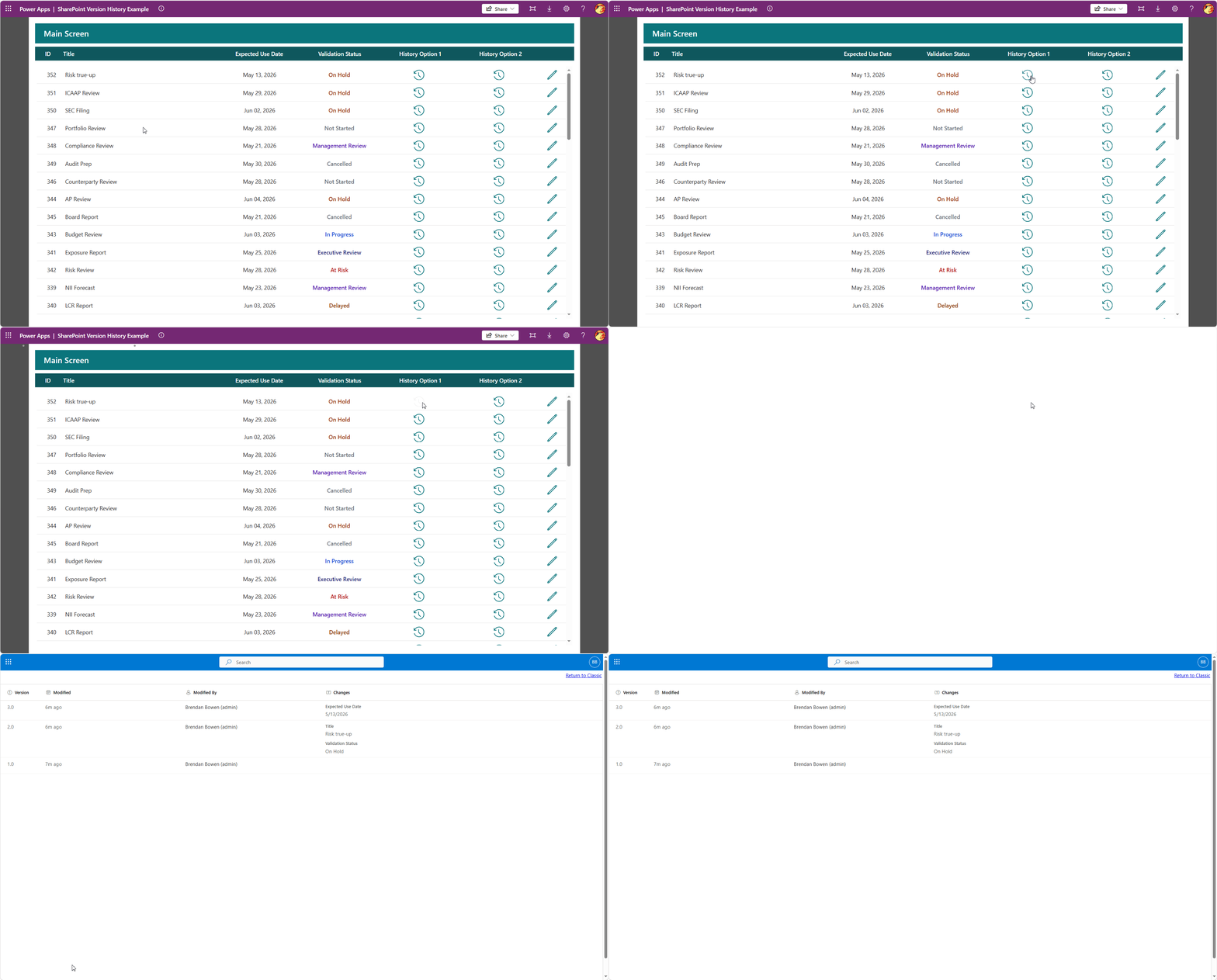
Pros:
- ✅ Very easy to configure/low code
- ✅ Takes advantages of the out-of-box SharePoint Version History Experience
Cons:
- ❌ Not truly integrated into the PowerApp, as it opens in a new browser tab
This second option is more complex than the first, but it gives us complete control over how we integrate the Version History into the Power App.
We’ll use the same parameters as before to pass the List Item ID, along with the SharePoint Site and List environment variables. However, this time we’ll call the SharePoint HTTP action endpoint for version history and return the results array.
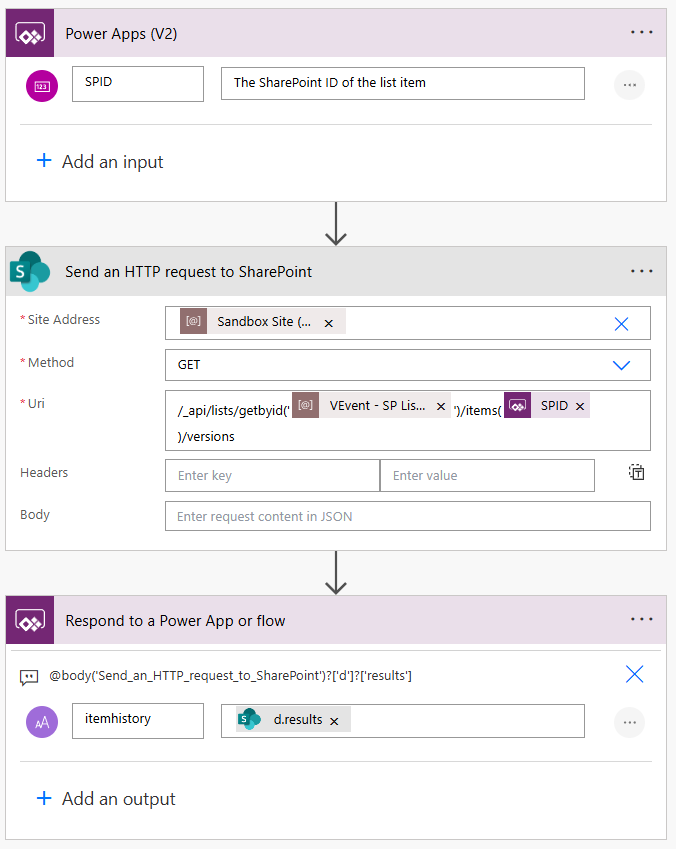
/_api/lists/getbyid('[SHAREPOINT LIST ID]')/items([SPID])/versions The most challenging part is building the results collection. Using the ForAll function along with parsing the JSON response, we need to dynamically construct a collection from the values returned in the array. One field you will definitely want to include is VersionId, since we’ll use it later to compare records against previous versions and identify changes.
The fields you include in the collection will largely depend on what data you want to track in your version history. This step is manual, as you’ll need to map each column in your collection to the corresponding field internal name returned in the response payload.
Once we create the initial collection, we build a second collection that iterates through the first collection and retrieves the previous version for each record. Using the ChangeFields table in my collection, I define the field name, whether the value changed, and the previous and current values.
/*
Collect the Version History via Power Automate for the List Item
Construct a collection based on the field(s) in which you want to track. You have to manually map the field(s).
At a minimum, VersionLabel, VersionId, Created, and ModifiedBy Should be collected.
Then, a differences collection is created to check for field differences between the current and prior version
*/
Set(
    varItemHistory,
    'VEvent-GetApprovalHistoryv2'.Run(ThisItem.ID).itemhistory
);
If(
    !IsBlank(varItemHistory),
    ClearCollect(
        collItemHistory,
        ForAll(
            Table(ParseJSON(varItemHistory)),
            {
                Title: Text(Value.Title),
                VersionLabel: Text(Value.VersionLabel),
                VersionId: Value(Value.VersionId),
                Created: DateTimeValue(Text(Value.Created)),
                ModifiedBy: Text(Value.Author.LookupValue),
                ValidationStatus: Text(Value.Validation_x005f_Status),
                ExpectedUseDate: Text(
                    DateAdd(
                        Text(Value.Expected_x005f_Use_x005f_Date),
                        -TimeZoneOffset(),
                        TimeUnit.Minutes
                    ),
                    DateTimeFormat.ShortDate
                )
            }
        )
    );
    ClearCollect(
        collItemHistoryDiff,
        ForAll(
            ForAll(
                collItemHistory,
                With(
                    {
                        wCurrentVersionId: ThisRecord.VersionId,
                        wCurrentRecord: ThisRecord
                    },
                    With(
                        {
                            wPrevious: Last(
                                Sort(
                                    Filter(
                                        collItemHistory,
                                        VersionId < wCurrentVersionId
                                    ),
                                    VersionId,
                                    SortOrder.Ascending
                                )
                            )
                        },
                        {
                            VersionLabel: wCurrentRecord.VersionLabel,
                            EditedDate: wCurrentRecord.Created,
                            ModifiedBy: wCurrentRecord.ModifiedBy,
                            ChangedFields: If(
                                !IsBlank(wPrevious.VersionId),
                                Concat(
                                    Filter(
                                        [
                                            {
                                                Field: "Title",
                                                Changed: wCurrentRecord.Title <> wPrevious.Title,
                                                From: wPrevious.Title,
                                                To: wCurrentRecord.Title
                                            },
                                            {
                                                Field: "Validation Status",
                                                Changed: wCurrentRecord.ValidationStatus <> wPrevious.ValidationStatus,
                                                From: wPrevious.ValidationStatus,
                                                To: wCurrentRecord.ValidationStatus
                                            },
                                            {
                                                Field: "Expected Use Date",
                                                Changed: wCurrentRecord.ExpectedUseDate <> wPrevious.ExpectedUseDate,
                                                From: wPrevious.ExpectedUseDate,
                                                To: wCurrentRecord.ExpectedUseDate
                                            }
                                        ],
                                        Changed
                                    ),
                                    Field & ": " & From & " → " & To,
                                    Char(10)
                                ),
                                "Initial version"
                            )
                        }
                    )
                )
            ),
            {
                VersionLabel: VersionLabel,
                EditedDate: EditedDate,
                ModifiedBy: ModifiedBy,
                ChangedFields: ChangedFields
            }
        )
    );
    Navigate(
        'Approval History',
        ScreenTransition.None,
        {ctxID: ThisItem.ID}
    ),
    // Else error collecting version history
    Notify(
        "Error collecting version history",
        NotificationType.Error,
        2000
    )
)
Phew…still with me? Here’s the end result shown on a new screen:
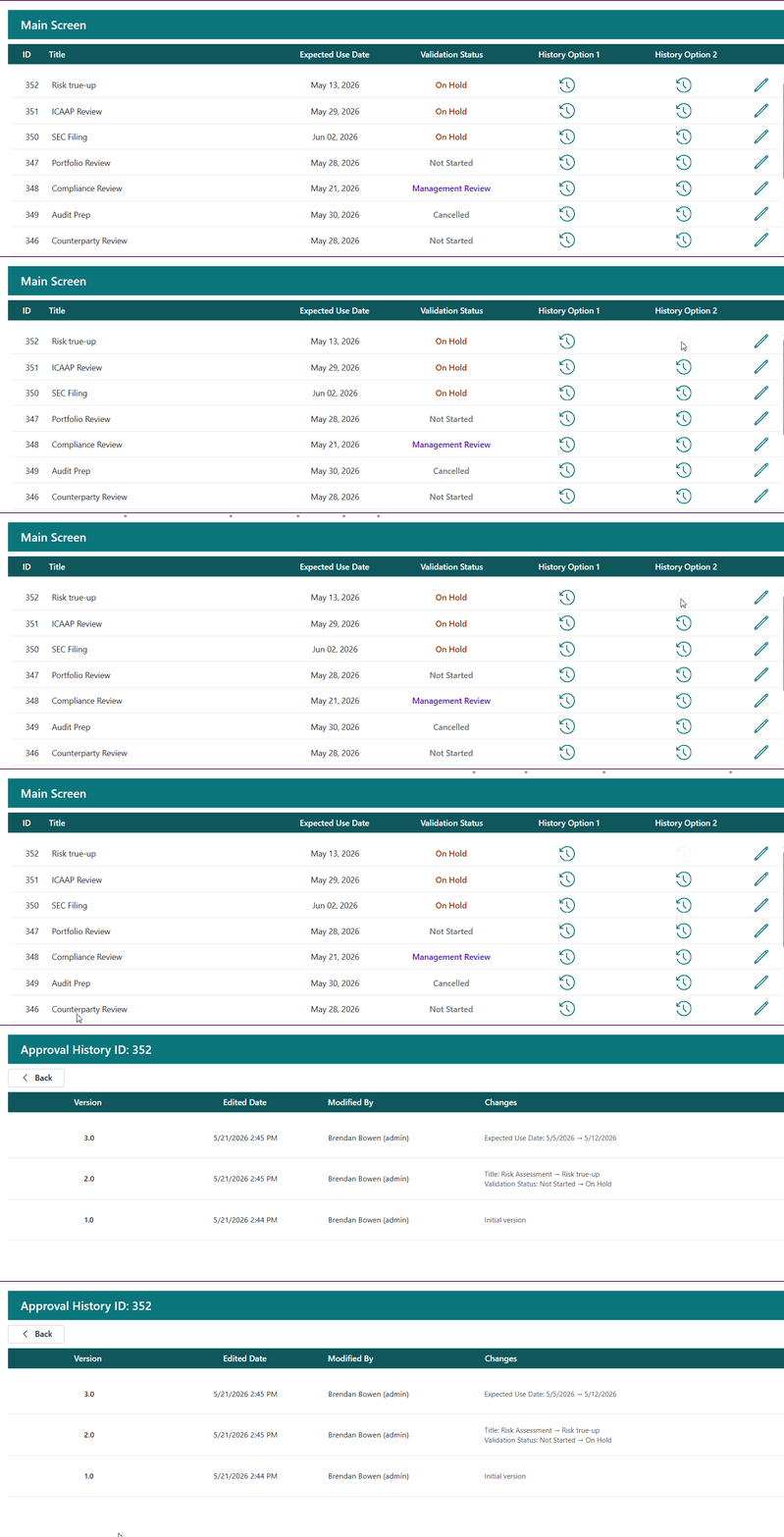
For the date/time fields, the response will be in UTC time. I used DateAdd and the TimeZoneOffset method to convert the time back to my local time.
Pros:
- ✅ True integration of the version history displayed in the PowerApp itself
- ✅ Allows for custom build out over data displayed and UI/UX
Cons:
- ❌ More complex to setup and maintain
- ❌ If list schema lists, requires an update in the PowerFx code
Conclusion
For the “quick and dirty” approach, option 1 is the best way to go, but if you’re looking for a more personalized user experience to interact with the data, option 2 provides a solid foundation.